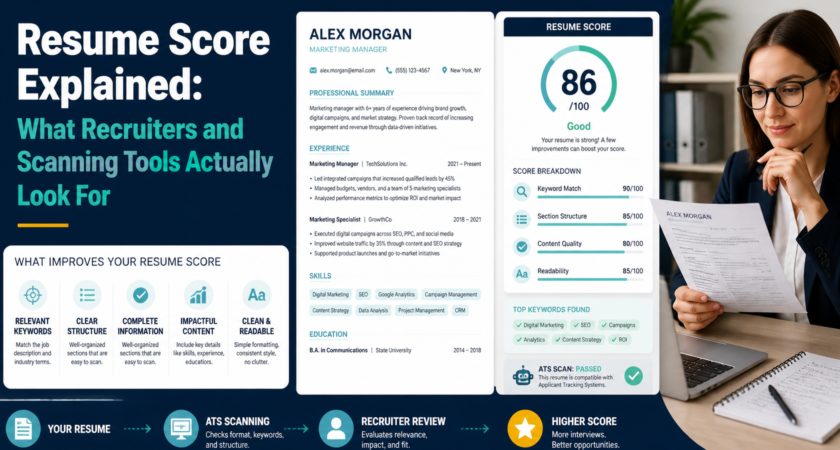
You upload your resume to a scanning tool and get a number back: 62, 74, 88. But what does that number actually mean, and what should you do about it? This guide breaks down how resume scores work, what goes into them, and how to improve yours.
What is a resume score?
A resume score is a quick estimate of how well your resume fits a target role and how easily it can be read by both software and people. Different tools calculate it differently, but most look at the same core areas.
Think of it as a health check, not a verdict. A low score doesn’t mean you’re unqualified. It usually means your resume isn’t showing your qualifications clearly.
What goes into a resume score
1. Keyword and skills match
Does your resume contain the skills, tools, and terms the job asks for? This is usually the biggest factor, because both ATS software and recruiters search for them.
2. Relevance of experience
Your experience should connect to the role you want. Scanners and recruiters both look for related job titles, responsibilities, and industries.
3. Measurable achievements
Numbers stand out. “Increased monthly leads by 30%” tells a stronger story than “responsible for lead generation.”
4. Structure and readability
Clear headings, consistent formatting, and a logical order make your resume easy to parse. Tables, columns, text boxes, and graphics can confuse ATS software.
5. Length and clarity
For most early and mid-career candidates, one to two pages works best. Dense paragraphs and vague phrases lower readability.
6. Completeness
Contact details, education, work history, and skills should all be present and easy to find.
What recruiters look for that no score captures fully
Software can count keywords, but humans notice other things:
- A clear story: does your career path make sense for this role?
- Impact over duties: what changed because you were there?
- Professionalism: typos, inconsistent dates, and sloppy formatting leave a bad impression
- Fit signals: relevant projects, certifications, and growth
That’s why the best approach combines a good score with a resume that reads well to a person.
Want to know your score?
Guessing is hard. Check your resume score at careerscan.app and see how your resume performs, along with which areas to fix first.
Find out where you stand: Upload your resume at careerscan.app and get clear, actionable feedback in seconds.
How to read your score
- Low score: usually a keyword, relevance, or formatting problem. Start with the basics.
- Medium score: your foundation is solid. Focus on tailoring and adding measurable results.
- High score: polish the details, then check that the resume still sounds like you.
Remember that a score for one job isn’t a score for every job. The same resume can score very differently against different job descriptions, which is why tailoring matters.
How to improve your resume score
- Tailor to each job. Mirror the language of the job description wherever it’s truthful.
- Add numbers. Quantify results with percentages, counts, timeframes, and values.
- Simplify formatting. Use standard headings and clean layouts.
- Strengthen your skills section. List relevant tools and skills clearly.
- Cut the fluff. Remove filler phrases, outdated roles, and irrelevant details.
- Proofread. Errors cost you with every reader.
- Re-scan after each change. Track whether your edits actually help.
Mistakes to avoid
- Chasing a perfect score at the expense of honesty
- Stuffing keywords so the resume reads unnaturally
- Ignoring the human reader
- Using one resume for every application
Final thoughts
A resume score is a useful starting point. It shows you what a scanner sees, so you can fix what’s holding you back. Pair it with strong, honest content and a clear story, and you’ll be in good shape.
Curious what your number is? Get your resume score at careerscan.app and start improving today.